Classification of user rights in the system
The administration system has different roles for the users: Participant, coach, instructor, teacher, test leader, developer, administrator and company administrator. Each role has different rights in the administration system.
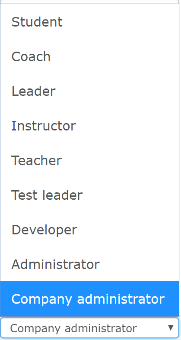
Rights
Below you get a step by step introduction to the most important functionality split by privilege.
(See also full overview further down in the document.)
| Role | Description |
|---|---|
| Student / Participant | A course user or employee/student at a school/business. Users can log on to their school and access courses and options in their interface. Users do not have access to the management system. |
| Coach (Contact Person) | Can log on to the system and retrieve reports on its users. The coach only has access to read and print reports, not to make any changes. |
| Leader | Can log on and see users in their class/group. The manager only has access to read and print reports, not to make any admin changes. |
| Teacher | Is a course instructor or teacher at a school. The supervisor can log on to his school and gain access to courses and options in his interface. The supervisor has limited rights in admin. |
| Instructor | Is a course instructor at a school. The instructor has limited rights in admin. Can create users and take out reports for their class or subclass. |
| Developer | Is a content producer or course developer at a school. Authors can log on to their school and access courses and other options in the user interface. Authors can also develop courses in the authoring tool. The author has limited rights in the administration system. |
| Administrator / Admin | Is the principal of a school/business. The administrator has access to the entire system and can manage classes, courses, and other users. |
info
The top two levels (companyadmin and superadmin) are used only by system administrators.