Certificate Templates
Create and customize certificate templates that are awarded to learners when they complete courses or groups.
Certificates must be enabled in MentorKit LMS → Settings before the Certificates menu appears.
Overview
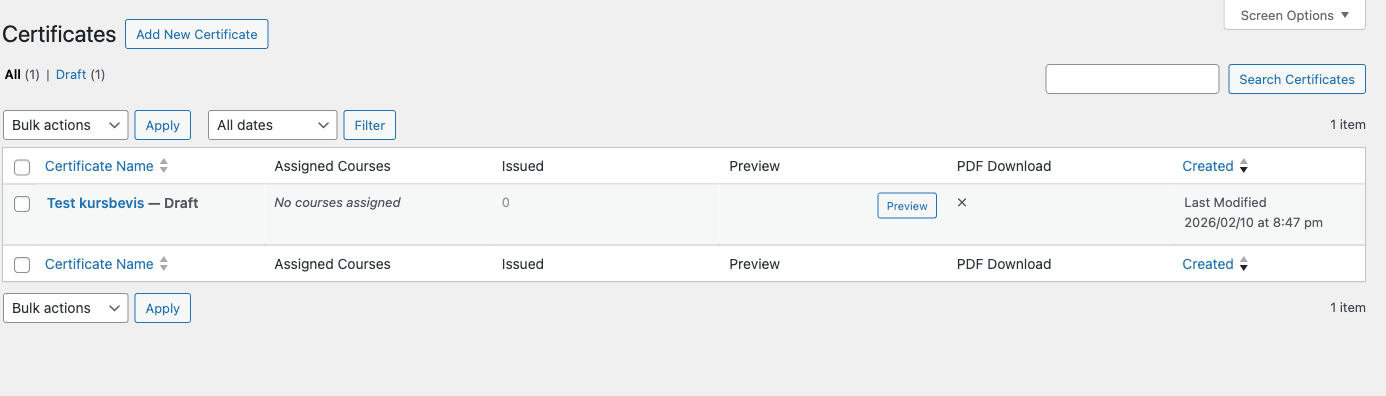
From your WordPress dashboard, go to MentorKit LMS → Certificates. This opens the certificate template list — each template is a reusable design that can be assigned to one or more courses or groups.
Creating a Template
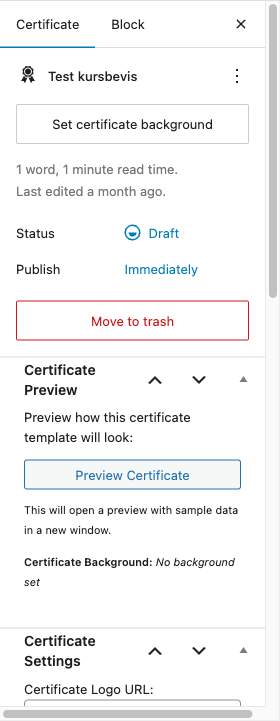
Click Add New to create a certificate template. The editor has the standard WordPress content area for the certificate body plus several configuration panels in the sidebar.
Certificate Settings
| Field | Type | Default | Description |
|---|---|---|---|
| Certificate Logo URL | Text input | Empty | URL to your organization's logo |
| Certificate Frame URL | Text input | Empty | URL to a decorative border/frame image |
| Font Family | Dropdown | Arial | Choose from system fonts, Google Fonts, or enter a custom font |
| Enable PDF Download | Checkbox | Checked | Allow learners to download certificates as PDF |
| PDF Orientation | Radio | Portrait | Portrait or Landscape |
| PDF Size | Dropdown | A4 | A4, Letter, or Legal |
Available font families include system fonts (Arial, Georgia, Verdana), elegant serifs (Playfair Display, Merriweather, Lora), modern sans-serifs (Montserrat, Roboto, Poppins), and decorative scripts (Great Vibes, Dancing Script).
Template Variables
Use these placeholders in the certificate content editor. They are replaced with real data when the certificate is issued.
| Variable | Replaced with |
|---|---|
{{user_name}} | Learner's display name |
{{first_name}} | Learner's first name |
{{last_name}} | Learner's last name |
{{user_email}} | Learner's email address |
{{course_name}} | Course or group name |
{{completion_date}} | Date the course was completed |
{{issue_date}} | Date the certificate was issued |
{{certificate_number}} | Unique certificate identifier |
{{site_name}} | Your website name |
{{site_url}} | Your website URL |
Preview
The Certificate Preview meta box in the sidebar lets you click Preview Certificate to see how the template renders with sample data.
Issued Certificates
The Issued Certificates meta box on the template edit page shows all certificates that have been issued using this template.
| Column | Shows |
|---|---|
| User | Learner's display name |
| Course | Course or group title |
| Awarded Date | When the certificate was issued |
| Score | Completion score percentage (course certificates only) |
| Actions | View Certificate, Download PDF |
What's Next
- Certificate Expiration - Configure expiration policies and renewal
- Issuing Certificates - Automatic and manual certificate issuance