Paid Courses
Sell individual courses through WooCommerce by linking them to a product with pricing.
Prerequisites
- WooCommerce is installed and active and the integration is enabled in MentorKit LMS → Settings
- WooCommerce Accounts & Privacy is configured — see Account Settings
Enable paid access for the course
First, edit the course and set Course Access to Buy now in the SCORM Package Details section. This reveals the WooCommerce Settings meta box further down the page.
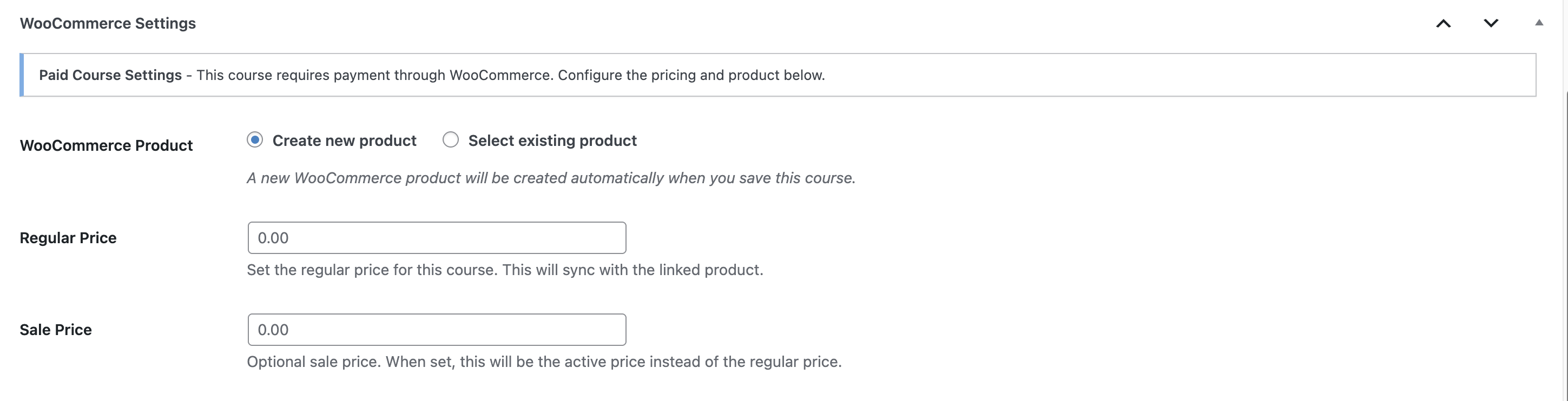
WooCommerce settings
WooCommerce Product
Choose how to link the course to a WooCommerce product:
- Create new product — A new WooCommerce product is created automatically when you save the course.
- Select existing product — Link the course to an existing product from the dropdown. Useful when migrating from another setup or reusing a product with specific settings.
Regular Price
The standard price for the course. Synced to the linked WooCommerce product on save.
Sale Price
Optional. When set, this becomes the active price instead of the regular price. The original price displays crossed out next to the sale price.
Tax class
Override the WooCommerce tax class for this course only — useful when a single course is VAT-exempt while the rest of the catalog charges standard MVA. See Tax Class per Course and Group.
What's Next
- Paid Groups — Sell bundled access via groups instead of single courses
- Tax Class per Course and Group — Per-product MVA overrides
- Account Settings — Required WooCommerce Accounts & Privacy config